AppleSkin adds useful food and hunger information to the Minecraft interface. It reveals values that already exist in the game but are normally hidden, helping you choose food and understand when hunger begins to decrease.
Detailed Hunger and Food Information
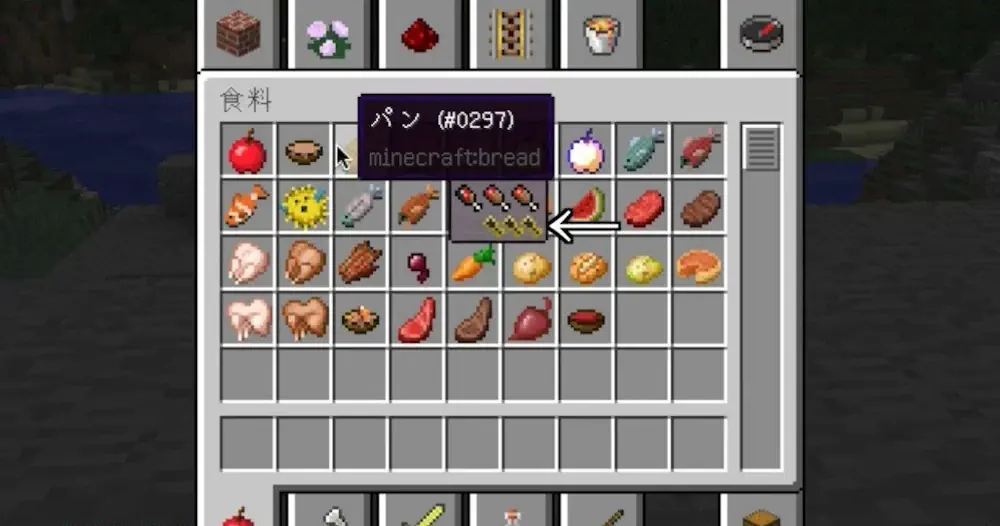
Food tooltips show how many hunger points and how much saturation an item restores. You can compare meals before eating instead of judging them only by the number of visible hunger icons.
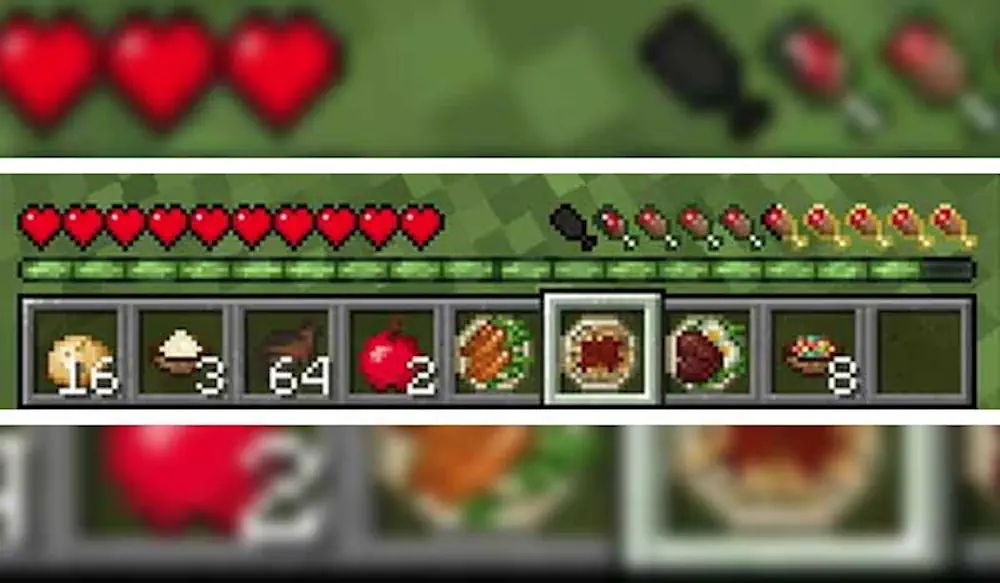
When food is held, the hunger bar previews the amount it will restore. A separate overlay displays the expected saturation, while another indicator can estimate how much health may be recovered through natural regeneration.
AppleSkin also visualizes the current saturation level and hunger exhaustion. Saturation acts as a hidden reserve that is consumed before the visible hunger bar starts dropping. Exhaustion increases while sprinting, jumping, mining, fighting, and performing other actions.
Additional values are available through the F3 debug screen. This makes it easier to test food, track hunger usage, and understand why two meals with similar hunger values may last for different amounts of time.
The mod does not alter food effects, regeneration, hunger speed, or other survival mechanics. It only displays existing information through tooltips and HUD elements, keeping the original gameplay unchanged.
Screenshots
How to Install AppleSkin
- Download AppleSkin for your Minecraft version and mod loader.
- Move the JAR file into the mods folder.
- Launch Minecraft and hover over food to view its values.